Getting Started with Microsoft Graph
I am a full-stack developer with 9+ years of experience, passionate about the JavaScript ecosystem. I have a bachelor's degree in computer science. I am most skilled and passionate about Angular and React. I am able to provide meaningful contributions to the design, installation, testing, and maintenance of any type of software system. I like to challenge myself in new roles. I have built and successfully delivered applications in multiple domains. In my free time, I like to write blogs related to software development. I have the pleasure of working on exciting projects across industries. The applications that I developed were scalable, deployable, and maintainable. I have a vision of providing cutting-edge web solutions and services to enterprises. Developed zero-to-one products.

A Practical Guide for Modern App Developers
Modern applications don’t live in isolation—they need access to users, emails, calendars, files, teams, and security data. This is exactly where Microsoft Graph comes in.
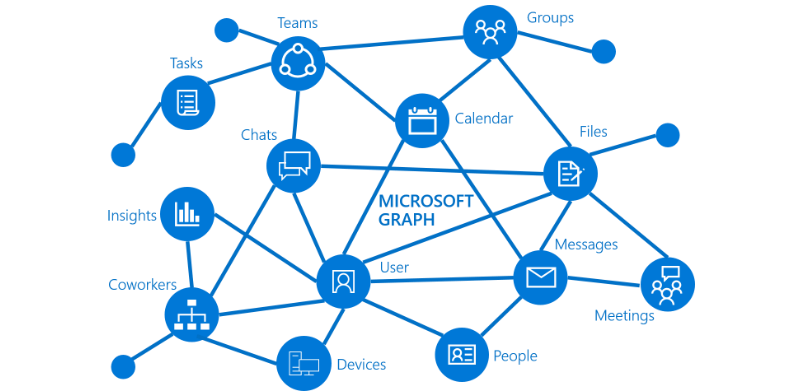
Microsoft Graph is a single, unified API that lets you access data across Microsoft 365, Azure, and Enterprise services using one consistent model.
This blog will help you understand what Microsoft Graph is, why it matters, and how to get started.
What is Microsoft Graph?
Microsoft Graph is a REST API that provides access to data from Microsoft services such as:
Microsoft Entra ID (users, groups, roles)
Outlook (mail, calendar, contacts)
OneDrive & SharePoint (files)
Microsoft Teams (teams, channels, chats)
Security & audit logs
Instead of calling multiple APIs, you call one endpoint:
https://graph.microsoft.com
Why Use Microsoft Graph?
Microsoft Graph is widely used in enterprise and cloud applications because it offers:
🔐 Secure access with OAuth 2.0
🔁 Unified data model
⚡ Real-time Microsoft 365 data
🧩 Easy integration with Azure & Entra ID
🏢 Enterprise-ready permissions & controls
If your app works with users, emails, calendars, or Teams, Microsoft Graph is essential.
Common Use Cases
Microsoft Graph is commonly used to:
Fetch user profile details
Read/send emails programmatically
Manage calendar events
Access OneDrive or SharePoint files
Automate Teams operations
Audit user activity
Build admin dashboards
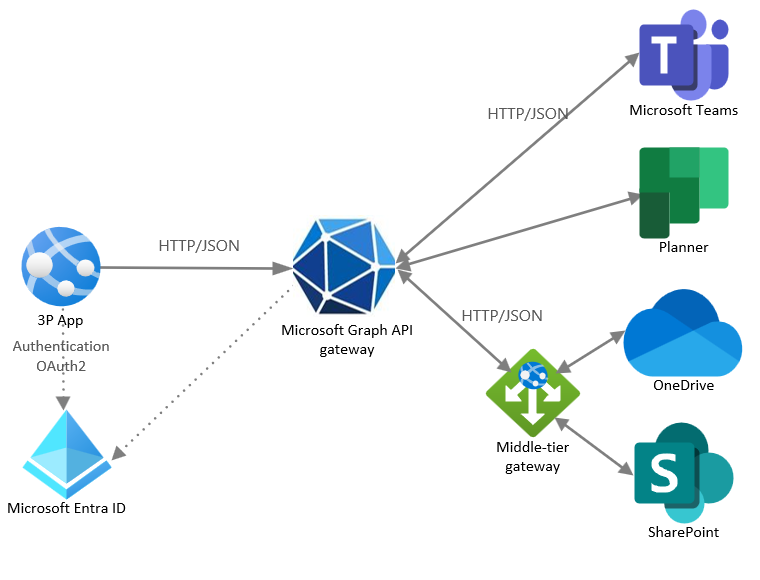
How Microsoft Graph Works (High Level)
Your App
  ↓ (OAuth Token)
Microsoft Entra ID
  ↓
Microsoft Graph API
  ↓
Microsoft 365 / Azure Data
👉 Authentication is handled by Microsoft Entra ID, and Graph returns data based on granted permissions.
Prerequisites
Before using Microsoft Graph, you need:
An Azure account
App Registration in Entra ID
Basic REST API knowledge
Familiarity with OAuth 2.0
Step 1: Register Your Application
Go to Microsoft Entra ID
Open App registrations
Create a new app
Note down:
Client ID
Tenant ID
Add required API permissions for Microsoft Graph
Step 2: Choose Permission Type
Microsoft Graph supports two permission models:
Delegated Permissions
User is signed in
App acts on behalf of a user
Example: Reading signed-in user’s emails
Application Permissions
App runs without a user
Used for background jobs & services
Example: Reading all users in a tenant
Choosing the right model is crucial.
Step 3: Call Microsoft Graph API
Example: Get Logged-in User Profile
GET https://graph.microsoft.com/v1.0/me
Authorization: Bearer <access_token>
Sample response:
{
  "displayName": "neweraofcoding",
  "mail": "neweraofcoding@company.com",
  "jobTitle": "Software Engineer"
}
Using Microsoft Graph in .NET
var graphClient = new GraphServiceClient(authProvider);

var user = await graphClient.Me
    .Request()
    .GetAsync();
This integrates seamlessly with ASP.NET Core APIs and background services.
Using Microsoft Graph in Angular
this.http.get(
  'https://graph.microsoft.com/v1.0/me',
  { headers: { Authorization: `Bearer ${token}` } }
);
Perfect for dashboards and profile-based apps.
Best Practices
✔ Request minimum permissions
✔ Use application permissions carefully
✔ Cache tokens efficiently
✔ Handle throttling & retries
✔ Monitor Graph usage
✔ Secure secrets using Managed Identities
Common Mistakes to Avoid
❌ Requesting too many permissions
❌ Storing tokens insecurely
❌ Ignoring permission consent
❌ Using Graph directly from frontend without protection
❌ Not handling API throttling
When Should You Use Microsoft Graph?
Use Microsoft Graph if your application needs:
Microsoft 365 data
User identity & profile info
Enterprise automation
Teams, Outlook, or OneDrive integration
Organization-wide insights
Final Thoughts
Microsoft Graph is the gateway to Microsoft 365 and Azure data. Once you understand authentication, permissions, and API calls, it becomes a powerful tool for building intelligent, enterprise-grade applications.
If you’re working with Azure, Entra ID, Angular, or .NET, Microsoft Graph is a must-have skill.